What happened # Memory prices have surged approximately 90% in Q1 2026 compared to Q4 2025, according to Counterpoint Technology Market Research. TrendForce expects DRAM contract prices to climb 90-95% in Q1 2026, with NAND flash up 55-60% in the same period. The shortage stems from the three largest RAM manufacturers—Samsung Electronics, SK Hynix, and Micron Technology, who control 93% of the market—prioritizing high-bandwidth memory production for AI data centers.
What happened # Samsung unveiled its Galaxy S26 series on February 25, 2026, positioning it as the company’s third-generation AI phone. The lineup includes the S26, S26+, and S26 Ultra, all released on March 11, 2026. These devices run Android 16 with One UI 8.5 and come with a promise of 7 years of OS and security updates.
What happened # Apple announced the iPhone 17e, bringing MagSafe wireless charging to its budget iPhone line for the first time. The iPhone 16e predecessor featured basic wireless charging but lacked MagSafe accessory support. The 17e includes Apple’s magnetic attachment system for chargers, stands, cases, wallets, and camera accessories that snap to the device’s back.
The iPhone 17e ships with Apple’s A19 processor and the C1X cellular modem, both representing the latest generation of Apple’s custom silicon. The base model doubles storage from the previous generation, starting at 256GB instead of 128GB. Apple set the starting price at $599, with a 512GB option available for $799.
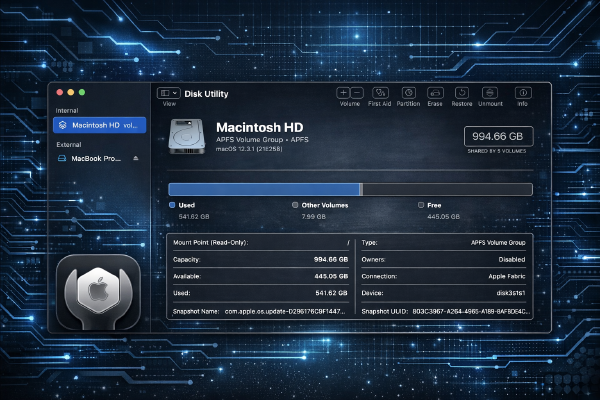
What you’ll need # macOS Sonoma 14.3 or later (tested on macOS Sonoma 14.3) Administrator privileges on your Mac External drive or secondary internal volume for testing (backup all data first) Basic understanding of file systems (APFS, HFS+, exFAT) Terminal access for command-line operations Overview # This tutorial covers using Disk Utility and the diskutil command-line tool to repair disk errors, create partitions, and securely erase drives. You’ll learn both GUI and terminal methods for managing storage on macOS.
What you’ll need # Windows 10 (build 19041+) or Windows 11 (any build) UEFI firmware with Secure Boot enabled Administrator account access Basic understanding of PowerShell and Windows Update 500 MB free disk space for certificate updates Active internet connection for Windows Update Overview # Microsoft is deprecating older Secure Boot certificates in June 2026, requiring all Windows users to update their boot security certificates. This guide walks you through checking your current certificate status and installing the updated certificates to maintain system security and avoid boot failures.
What you’ll need # Windows 11 version 23H2 or later (build 22631+) Administrator privileges on your Windows account PowerShell 5.1 or later (built into Windows 11) Basic familiarity with PowerShell and Windows Registry Windows 11 Pro or Enterprise for Group Policy features (Home users can use Registry edits) Overview # This guide disables Windows 11’s AI-powered features including Recall snapshots, Copilot assistant, and background telemetry services. You’ll reduce resource usage, improve privacy, and remove taskbar clutter while maintaining system stability.